Clearer Voice: Noise and Echo Removal on the i.MX 8M Plus Audio DS
How we taught the small audio DSP processor inside the NXP i.MX 8M Plus to clean up speech by itself, before the sound ever reaches Linux using SoF.
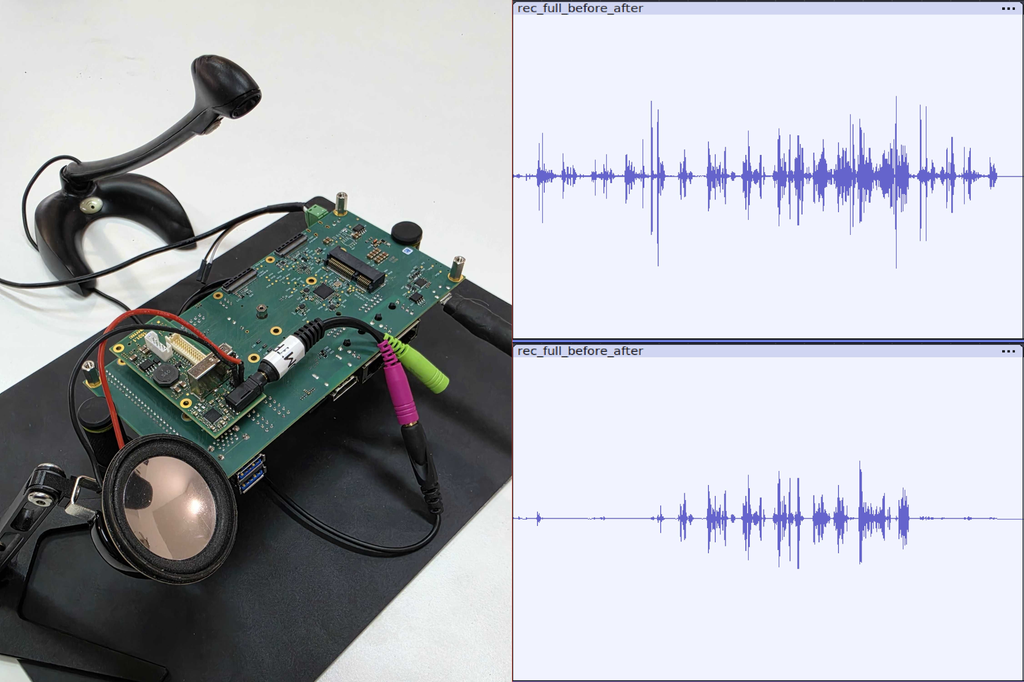
Think of a video call, a door intercom, or a hands-free terminal on a factory floor. We all expect the other person to hear us and not the fan in the background or their own voice coming back from our speaker. That works because of two pieces of signal processing that run quietly in the background: noise suppression and echo cancellation.
On most devices this work is done by the main processor. We moved it somewhere smarter: onto the dedicated audio processor that already sits inside the NXP i.MX 8M Plus chip.
In this project we:
- Brought up audio on the audio processor (DSP) of the PHYTEC phyBOARD-Pollux i.MX 8M Plus for both playback and recording.
- Added noise suppression and echo cancellation to it, based on the open-source SpeexDSP library.
- Tested everything on the real board, in a real room, and measured how well it works.
DSP: a small helper inside the chip
The i.MX 8M Plus is more than one processor. Next to the main application cores, which run Linux and your application, it contains a DSP: a Digital Signal Processor (Cadence HiFi 4), a small processor that is especially good at number crunching on audio. You can think of it as a sound engineer who works in the back room, so the main processor can focus on everything else.
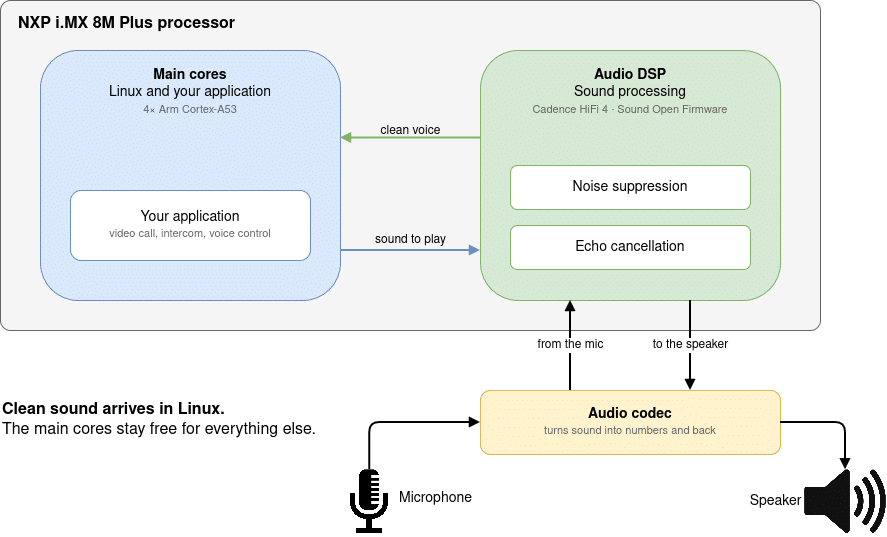
Letting the DSP do the audio work has some clear advantages:
- The main cores stay free for the user interface, networking or AI tasks.
- The timing is predictable. The DSP does nothing but audio, so the sound doesn’t stutter when Linux is busy.
- Room to save power. A dedicated audio processor can keep working while the main cores sleep, for example, to listen for a wake word.
To program the DSP we used Sound Open Firmware (SOF), an open-source audio firmware project hosted by the Linux Foundation, running on top of the Zephyr real-time operating system. SOF already supported NXP’s own evaluation board. Our first step was to make it work on the phyBOARD-Pollux and its PEB-AV-10 audio expansion board: we described the board’s audio hardware to Zephyr and SOF and set up the audio paths for playing and recording.
The result: Linux sees a normal sound card. Any application that can play or record sound works with it, and the DSP does the work underneath.
root@phyboard-pollux-imx8mp-3:~# aplay -l
**** List of PLAYBACK Hardware Devices ****
card 0: audiohdmi [audio-hdmi], device 0: i.MX HDMI i2s-hifi-0 [i.MX HDMI i2s-hi
    Subdevices: 1/1
    Subdevice #0: subdevice #0
card 1: sofsofaudio [sof-sof-audio], device 0: Port0 (*) []
    Subdevices: 1/1
    Subdevice #0: subdevice #0
root@phyboard-pollux-imx8mp-3:~# arecord -l
**** List of CAPTURE Hardware Devices ****
card 1: sofsofaudio [sof-sof-audio], device 0: Port0 (*) []
Subdevices: 1/1
Subdevice #0: subdevice #0
root@phyboard-pollux-imx8mp-3:~#Two problems every microphone has
1. Background noise
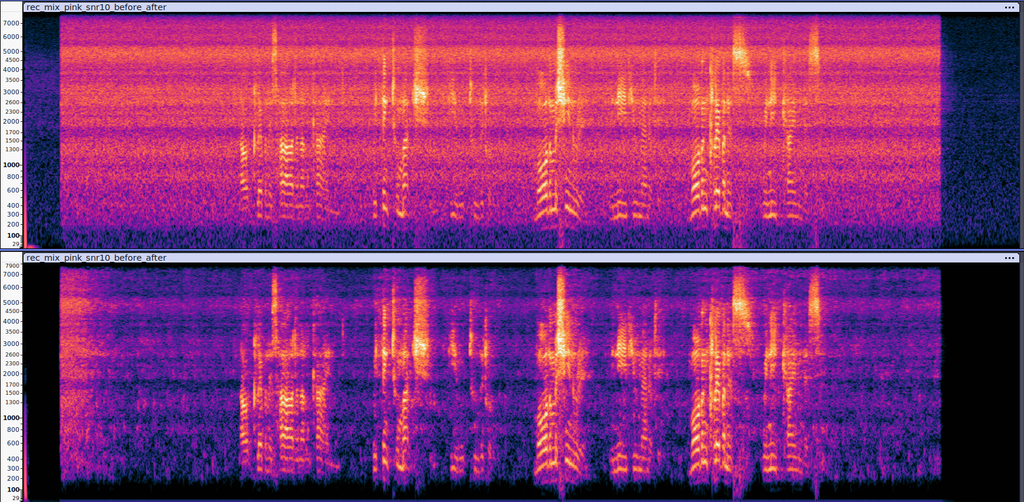
Fans, air conditioning, traffic, machines, etc.—a microphone hears all of it. Noise suppression listens to the sound continuously, learns what the steady background noise sounds like, and turns it down while leaving the voice alone.
2. Echo
In a call, the other person’s voice comes out of your speaker, travels through the room, and goes straight back into your microphone. Without treatment, they hear themselves again, a fraction of a second later. That’s the annoying echo everyone knows from bad calls.
Echo cancellation solves this with a simple idea: the device knows what it just played on the speaker. It keeps a copy, learns how that sound changes on its way through the room to the microphone, and subtracts the expected echo from the recording. What is left is your own voice.
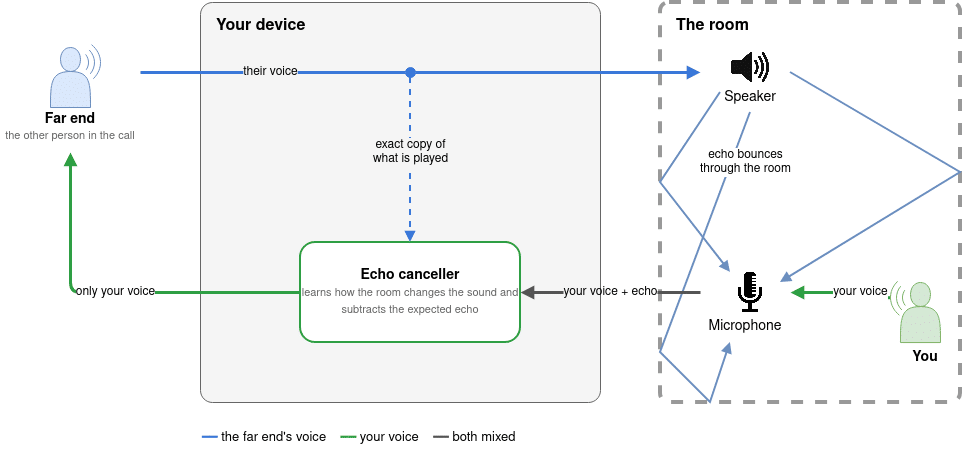
For both features we used SpeexDSP, a well-known open-source speech processing library. We adapted it to run on the DSP, connected it to the SOF audio paths, and made it work in real time next to normal playback and recording.
This took some engineering. The echo canceller needs a lot of computing power, too much to fit into the 1 ms audio cycle the DSP uses for playback and recording. So we gave it its own background task on the DSP. It gets the sound in 10 ms chunks, does its work, and hands the result back, while playback keeps running without interruption. We also process speech at 16 kHz, the quality used by modern „HD voice“ calls, which needs about a third of the computing power of full 48 kHz audio.
Testing in a real room
Simulations are useful, but sound in a real room behaves differently. So we built a small test lab on a desk:
- A PC speaker plays background noise and the voice of the local talker.
- The board’s own speaker plays the far-end voice (or music), which turns into echo.
- The board records the microphone with and without processing at the same time so that we can compare the two for exactly the same moment.
We used prepared test recordings: speech mixed with two kinds of noise at different loudness and a conversation in which both people sometimes talk at once. We wrote small tools that compare the recordings automatically. That way we can repeat a test after every change and see right away if something got better or worse.
The results
| What we measured | Result |
| Echo reduction | about 22 dB: more than 99 % of the echo energy is gone |
| Time to lear a new room | about 1 second |
| Both people talking at once | the local voice comes out about 17 dB cleaner than at the microphone |
| Background noise reduction | about 17–19 dB: roughly 98 % of the noise energy is gone |
| Effect on the voice | practically none (below 0.5 dB) unless the noise is nearly as loud as the voice |
| Processing time on the DSP | at most 2.2 ms for every 10 ms of sound |
| Dropouts or glitches during the tests | none |
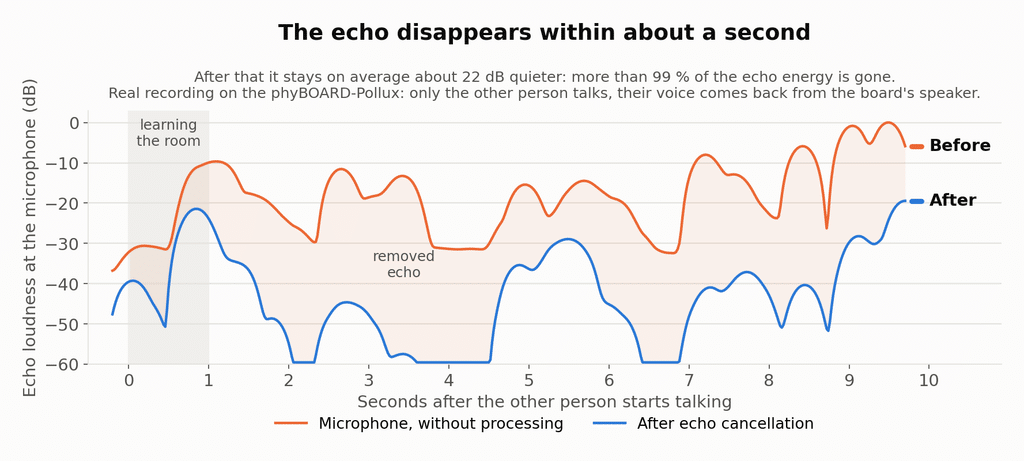
In plain words: the echo is reduced to a quiet trace, background noise is clearly lower, and the voice of the person talking stays natural. The DSP handles all of this with time to spare, and Linux simply gets clean audio.
Why it matters
For a product built on the NXP i.MX 8M Plus processor, this means:
- Better voice quality for intercoms, hands-free devices, voice control and video calls.
- No extra chip and no extra load on the main cores: the hardware is already on the board.
- An open-source base (SOF, Zephyr, SpeexDSP) with no license fees and no lock-in.
What’s next?
We’re contributing our work back to the open-source projects. Support for the phyBOARD-Pollux audio DSP is currently under review in the Zephyr project. SOF support for the board will follow, and then the Linux side.
There is also room to grow. So far the processing runs as plain C code. The DSP has special instructions for audio math, and using them should make the processing considerably faster, leaving room for more features on the same chip.
Links
- Sound Open Firmware (SOF): the open-source audio DSP firmware (source code)
- Zephyr Project: the real-time operating system SOF runs on
- Zephyr pull request: phyBOARD-Pollux audio DSP support [under review]
- SpeexDSP: the open-source noise suppression and echo cancellation DSP library (Speex project)
- PHYTEC phyBOARD-Pollux i.MX 8M Plus: the embedded board used in the experiment
- NXP i.MX 8M Plus product page (URL)