What Opener is
Opener is an open-source implementation of the DECT-2020 NR (DECT NR+) protocol stack, published by the Opener Initiative under Apache 2.0. Codium Electronique and Deveritec GmbH hold the copyright on most of its source files.
It ships as an out-of-tree Zephyr module on top of the nRF Connect SDK. Today it provides:
- A low-level radio driver for Nordic’s nRF91x1 SiPs (
dectnrp_nrf91x1), running on Nordic’s DECT NR+ PHY modem firmware. - A driver API: the application schedules RX, TX and RSSI scan operations, each starting now or at a set modem time, and gets an event back when each one finishes.
- No MAC layer yet. Applications talk to the driver directly and supply a small stub of the network layer themselves.
The companion repo opener-samples holds the reference applications. Its one sample, dectnrp-driver, is what we ran. The repo is pinned to nRF Connect SDK v3.4.0 (Zephyr 4.4.0) and tracks Opener’s main branch.
How we installed and built it
opener-samples is a west workspace. One setup fetches Zephyr, the nRF Connect SDK, Opener and Codium’s board SDK into deps/:
# Ubuntu 24.04 or later: build dependencies, from the Zephyr Getting Started guide
sudo apt update
sudo apt install --no-install-recommends git cmake ninja-build gperf \
    ccache dfu-util device-tree-compiler wget python3-dev python3-venv python3-tk \
    xz-utils file make gcc gcc-multilib g++-multilib libsdl2-dev libmagic1

# clone the samples and set up the west workspace
cd ~
git clone https://github.com/Opener-Initiative/opener-samples.git
cd ~/opener-samples
python3 -m venv .venv && source .venv/bin/activate && pip install west
west init -l samples && west update && west zephyr-export
west packages pip --install --c constraints.txt
west sdk install
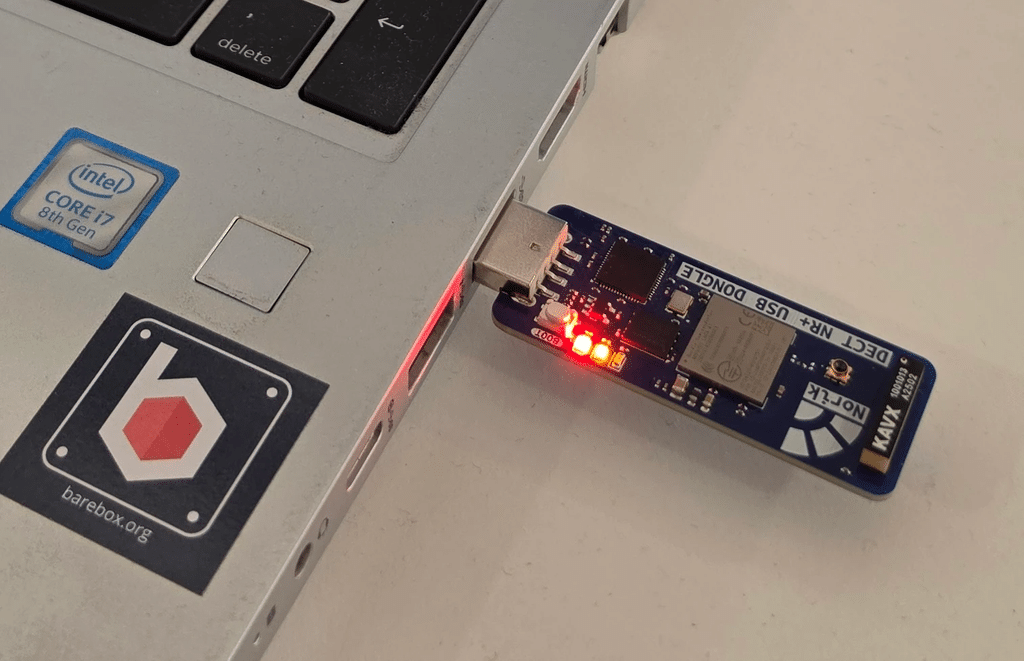
The sample officially targets the nRF9151 DK. Two additions made it build for our DECT NR+ USB dongle:
- Board definition. The dongle’s board is in upstream Zephyr main but not yet in nRF Connect SDK 3.4.0, so we use the definition from there, fetched with a sparse checkout and passed in through
BOARD_ROOT. - Sample board files. We added
dect_nr_plus_usb_dongle_nrf9151_ns.confand.overlaytosamples/dectnrp-driver/boards/. They are copies of the DK’s: they enable the DECT PHY modem library, drop MCUboot and size the modem’s shared memory.
cd ~/opener-samples && source .venv/bin/activate

# board files for the sample: copies of the nRF9151 DK's
cp samples/dectnrp-driver/boards/nrf9151dk_nrf9151_ns.conf \
   samples/dectnrp-driver/boards/dect_nr_plus_usb_dongle_nrf9151_ns.conf
cp samples/dectnrp-driver/boards/nrf9151dk_nrf9151_ns.overlay \
   samples/dectnrp-driver/boards/dect_nr_plus_usb_dongle_nrf9151_ns.overlay

# fetch only the dongle's board directory from upstream Zephyr
git clone --depth 1 --filter=blob:none --sparse https://github.com/zephyrproject-rtos/zephyr.git ../zephyr-boards
git -C ../zephyr-boards sparse-checkout set --no-cone /boards/norik/dect_nr_plus_usb_dongle/

west build -p always -b dect_nr_plus_usb_dongle/nrf9151/ns \
  -d build/dect_nr_plus_usb_dongle/nrf9151/ns/dectnrp-driver samples/dectnrp-driver \
  -- -DBOARD_ROOT=$PWD/../zephyr-boards
The image to flash is dectnrp-driver/zephyr/tfm_merged.hex under the build directory. It holds TF-M plus the application.
Flashing the two dongles
We flash with west flash, which the board sets up to run pyocd, through each dongle’s RP2040. Select the dongle by its probe serial number:
# Use pyocd list to get serial numbers of the dongles
pyocd list
  #   Probe/Board                                      Unique ID         Target
-----------------------------------------------------------------------------------------
  0   Raspberry Pi Debugprobe on DECT NR+ USB Dong     EF607856D36E2F23  n/a
  1   Raspberry Pi Debugprobe on DECT NR+ USB Dong     EF61307657562D32  n/a

# Flash the dongles
west flash -d build/dect_nr_plus_usb_dongle/nrf9151/ns/dectnrp-driver --dev-id <probe serial> --dt-flash=n- -dt-flash=n is only needed on nRF Connect SDK 3.4.0, whose flash runner crashes on Zephyr 4.4’s mapped flash partitions. Upstream Zephyr has already fixed this.
What the samples does
The sample has two radios find each other and exchange packets with no MAC layer.
At start-up each dongle sets its network and device IDs, reads the modem time and runs a one-frame RSSI scan on channel 1677. Then it loops: listen for up to 3 s, stopping at the first frame heard, then send a „Hello World“ frame. When it hears the other dongle’s frame, it learns that dongle’s short ID and the frame’s start time. From then on it schedules its own sends 1.5 s after the other dongle’s, on the modem clock. A listen window with nothing heard puts it back in the unsynchronized state.
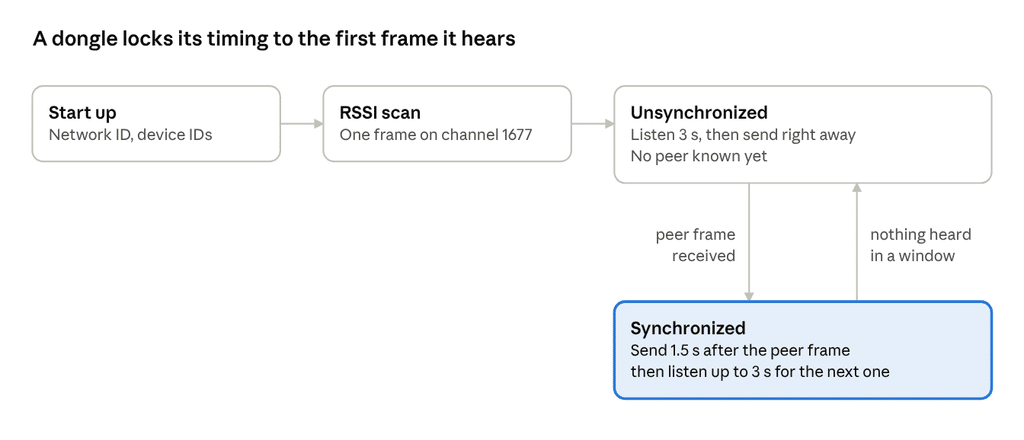
Both dongles start unsynchronized; the first frame one hears from the other moves it to synchronized.
With one dongle it still runs, listening and sending on its own fixed period; the second dongle is what exercises modem-time scheduling.
Running the sample
Watch the dongle’s serial console while you reset it. In the log below, the dongle synchronizes with its peer 5.6 s after the reset. The sample logs to the nRF9151’s UART. The dongle’s RP2040 forwards that UART to the PC as a USB serial port at 115200 baud. Open the console in one terminal, then reset the nRF9151 from a second one:
# terminal 1: the dongle's serial console (exit with Ctrl+A, then Ctrl+X)
sudo apt install picocom
picocom -b 115200 /dev/serial/by-id/usb-Raspberry_Pi_Debugprobe_on_DECT_NR+_USB_[

# terminal 2: reset the nRF9151
cd ~/opener-samples && source .venv/bin/activate
pyocd reset -t nrf91 -u <probe serial>
One dongle’s console after a reset, with the other dongle already running:
[INF] All pins have been configured as non-secure
[NOT] Booting TF-M v2.3.0**
[NOT] Built Wed 21 Oct 2026 10:24:14 UTC
[00:00:00.405,242] <wrn> dectnrp_nrf91x1: MFW version:mfw-nr+-phy_nrf91x1_2.0.0
[00:00:00.405,700] <wrn> dectnrp_nrf91x1: MFW uuid:75a511eb-5f17-488b-bb61-b1d29t
[00:00:00.405,731] <wrn> dectnrp_nrf91x1: MFW lib-version:3.4.0-dectphy-c2d94ec7e
[00:00:00.543,884] <inf> dectnrp_nrf91x1: nrf91x1 dectnrp radio initialized
[00:00:00.544,158] <inf> dectnrp_nrf91x1: nrf91x1_configure(dectnrp_nrf91x1)
[00:00:00.544,189] <inf> dectnrp_nrf91x1: Iface initialized
[00:00:00.544,982] <inf> dectnrp_nrf91x1: nrf91x1_start(dectnrp_nrf91x1)
[00:00:00.592,681] <inf> dectnrp_nrf91x1: DECT radio nrf91x1 started
*** Booting nRF Connect SDK v3.4.0-9953055607b ***
*** Using Zephyr OS v4.4.0-bf801e4e3d19 ***
[00:00:01.594,329] <inf> dectnrp_nrf91x1: nrf91x1_configure(dectnrp_nrf91x1)
[00:00:01.595,214] <inf> dectnrp_driver_sample: --------------------
[00:00:01.595,241] <inf> dectnrp_driver_sample: Local device:
[00:00:01.595,245] <inf> dectnrp_driver_sample: DEVICE_STATE_UNSYNCHRONIZED
[00:00:01.595,245] <inf> dectnrp_driver_sample: - network id 0x32545279
[00:00:01.595,245] <inf> dectnrp_driver_sample: - long device id 0x4b59d116
[00:00:01.595,275] <inf> dectnrp_driver_sample: - short device id 0xdb25
[00:00:01.595,275] <inf> dectnrp_driver_sample: - channel 1677
[00:00:01.595,275] <inf> dectnrp_driver_sample: --------------------
[00:00:01.595,458] <inf> dectnrp_nrf91x1: <82813659> nrf91x1_get_time()
[00:00:01.595,489] <inf> dectnrp_driver_sample: Network time=82813659
[00:00:01.606,606,781] <inf> dectnrp_driver_sample: RSSI1 scan on carrier:1677
[00:00:01.606,811] <inf> dectnrp_driver_sample: subslots [dBm] : [-98,-98,-97,-98,-9
[00:00:01.606,872] <inf> dectnrp_driver_sample: receive ...
[00:00:04.116,363] <inf> dectnrp_driver_sample: RX:PCC:
                               10 79 35 4f 71 ff ff 00  00 00
[00:00:04.116,424] <inf> dectnrp_driver_sample: PDC:
                               00 00 17 43 0d 48 65 6c  6c 6f 2f
                               21 0a 40 11 00 00 00 00  00 00 0f
                               00 00 00 00 00
[00:00:04.116,485] <inf> dectnrp_driver_sample: receive complete
[00:00:05.616,607] <inf> dectnrp_driver_sample: --------------------
[00:00:05.616,638] <inf> dectnrp_driver_sample: Local device:
[00:00:05.616,638] <inf> dectnrp_driver_sample: DEVICE_STATE_SYNCHRONIZED
[00:00:05.616,638] <inf> dectnrp_driver_sample: Remote device:
[00:00:05.616,668] <inf> dectnrp_driver_sample: - short device id 0x354f
[00:00:05.616,668] <inf> dectnrp_driver_sample: --------------------
[00:00:05.616,943] <inf> dectnrp_driver_sample: transmit
[00:00:05.617,889] <inf> dectnrp_driver_sample: transmit complete
[00:00:05.617,980] <inf> dectnrp_driver_sample: receive ...
[00:00:07.119,934] <inf> dectnrp_driver_sample: RX:PCC:
                               10 79 35 4f 71 db 25 00  00 00
[00:00:07.119,964] <inf> dectnrp_driver_sample: PDC:
                               00 00 17 43 0d 48 65 6c  6c 6f 2f
                               21 0a 40 11 00 00 00 00  00 00 0f
                               00 00 00 00 00
[00:00:07.120,025] <inf> dectnrp_driver_sample: receive complete
[00:00:08.620,391] <inf> dectnrp_driver_sample: transmit
[00:00:08.621,368] <inf> dectnrp_driver_sample: transmit complete
[00:00:08.621,459] <inf> dectnrp_driver_sample: receive ...
[00:00:10.123,321] <inf> dectnrp_driver_sample: RX:PCC:
                               10 79 35 4f 71 db 25 00  00 00
[00:00:10.123,382] <inf> dectnrp_driver_sample: PDC:
                               00 00 17 43 0d 48 65 6c  6c 6f 2f
                               21 0a 40 11 00 00 00 00  00 00 0f
                               00 00 00 00 00
[00:00:10.123,413] <inf> dectnrp_driver_sample: receive complete
[00:00:11.623,809] <inf> dectnrp_driver_sample: transmit
[00:00:11.624,786] <inf> dectnrp_driver_sample: transmit complete
What to look for:
- 0.4 s: the modem reports the DECT NR+ PHY firmware
mfw-nr+-phy_nrf91x1_2.0.0, and the radio initializes and starts. - 1.6 s: the local device: network ID
0x32545279, long ID from the chip ID, random short ID0xdb25and channel 1677. Then come the modem time and the RSSI scan, where about -98 dBm on every subslot shown means a quiet channel. - 4.1 s: the first frame from the other dongle. Its PHY header carries the sender’s short ID
35 4fand the broadcast receiver IDff ff, since the sender doesn’t know this dongle yet. The PDC is the „Hello World!“ MAC PDU. - 5.6 s: 1.5 s after that frame, the dongle is synchronized with
0x354fand sends its own frame. - 7.1 s onward: the peer’s frames now name this dongle’s short ID
db 25as receiver. They arrive every 3 s, and this dongle sends 1.5 s after each one.
Conclusion
Opener’s driver sample runs on the DECT NR+ USB dongle without any code changes. It needed only the dongle’s upstream Zephyr board definition and two board files copied from the nRF9151 DK. Two dongles synchronized within 8 s and kept exchanging frames without errors.
Opener has no MAC layer yet, so this is a radio-level demo: the application schedules RX and TX itself and handles its own timing.
Here at Norik, we’re excited to see what comes next in Opener.